How JD Updates Work
- You can edit and update the JD at any stage after job creation.
- Updated JD changes apply only to new candidates moving forward.
- Existing candidates are not automatically re-evaluated after JD changes.
This ensures ongoing hiring workflows are not interrupted unnecessarily.
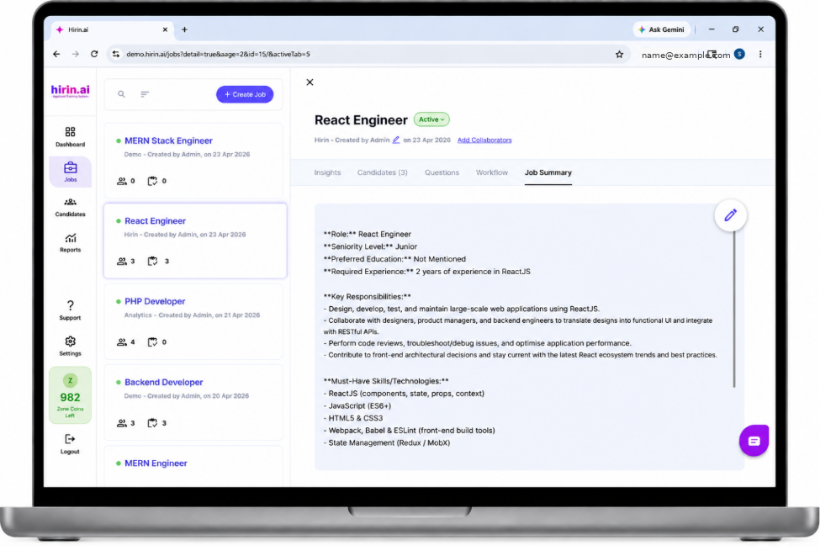
Figure 1: Editing the Job Description after creation
Manual Re-Run Screening
If you want existing candidates evaluated against the updated JD:
- Navigate to the Candidates tab.
- Manually trigger the screening process again for the required candidates.
This lets you selectively re-process candidates whenever needed.
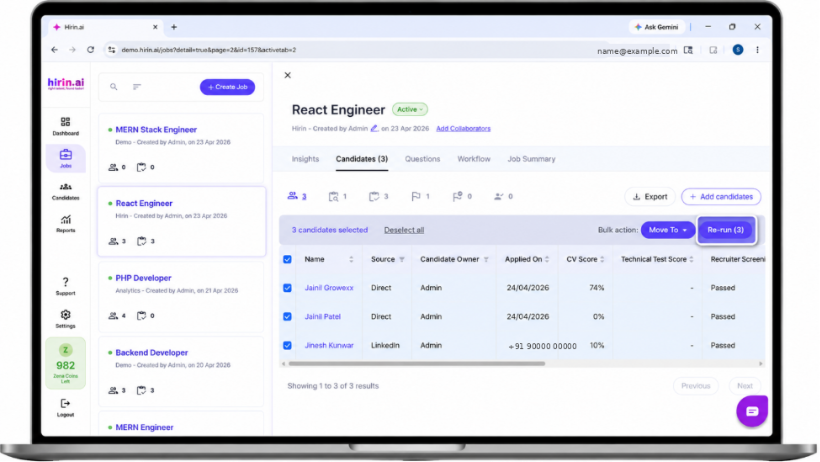
Figure 2: Manually re-running screening from the Candidates tab
How JD Updates Work
- You can edit and update the JD at any stage after job creation.
- Updated JD changes apply only to new candidates moving forward.
- Editing the Job Description applies only to new candidates unless you trigger a manual re-run.
This ensures ongoing hiring workflows are not interrupted unnecessarily.
Was this article helpful?
That’s Great!
Thank you for your feedback
Sorry! We couldn't be helpful
Thank you for your feedback
Feedback sent
We appreciate your effort and will try to fix the article