CV Screening in the Hiring Workflow
The CV Screening stage is part of the job setup workflow. By default, all candidates move to the next stage if no special settings are applied. Recruiters can choose to enhance this stage using Zena Intelligence to reach out to the most relevant candidates only.
What is Zena Intelligence? (Optional)
Zena Intelligence is an optional feature within the CV Screening stage, clearly marked as "Zena Intelligence (Optional)" in the system. When enabled, it automatically evaluates CVs against the criteria you define and reviews CVs to help identify the best candidates.
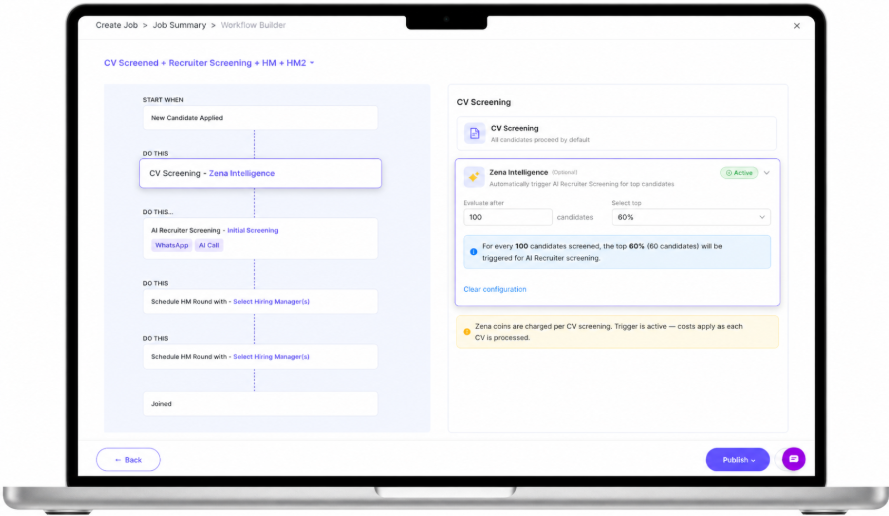
Figure 1: Zena Intelligence (Optional) within the CV Screening stage
How Zena Intelligence Works
- Select how many CVs you want to screen.
- Zena reviews all selected CVs and ranks candidates against the defined criteria.
- Only the top percentage of candidates is shortlisted.
- Shortlisted candidates are automatically moved to the next stage (e.g. AI Recruiter Screening).
Example: 100 CVs screened with a Top 60% criterion means the top 60 candidates automatically move to the next stage.
Multiple Screening Rules with AND/OR Logic
You can now configure multiple Zena Intelligence screening rules and define how candidates progress to the next stage after CV Screening. A second CV Screening rule is available under the Zena Intelligence section, and you can choose to enable only Batch Evaluation, only CV Score Screening, or both rules together.
Rule 1 – Evaluate in Batches
Configure how candidates are evaluated in groups:
- Evaluate candidates after a set number of applications (N applications).
- Select the Top X% of candidates to proceed.
Example: Evaluate after 50 candidates and select the Top 50%. The system automatically calculates and displays the result — “At least 25 candidates per batch will move forward to the next stage.”
Rule 2 – Trigger AI Screening Based on CV Score
Set a minimum CV Score threshold for progression.
- Example: Trigger AI Screening only if the CV Score is above 70%.
- Candidates scoring below the configured threshold are held for manual review.
Combining Rules with AND/OR Logic
When both screening rules are enabled, you can decide how they work together:
- AND Logic – A candidate must satisfy both conditions to proceed.
- OR Logic – A candidate can satisfy either condition to proceed.
This provides greater flexibility to configure strict or flexible screening workflows based on different hiring requirements.
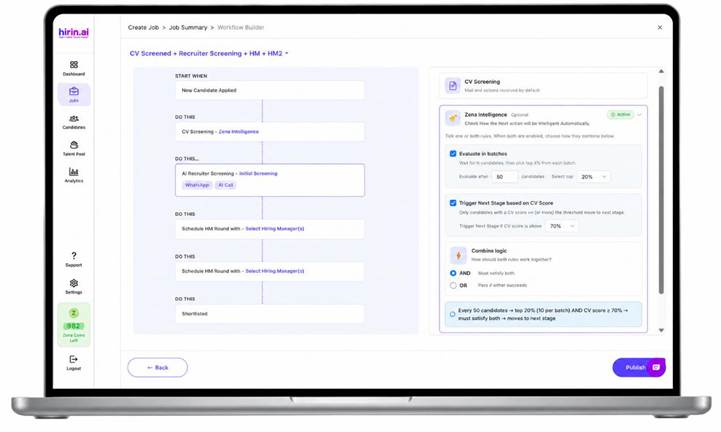
Figure 2: Configuring multiple Zena Intelligence screening rules with AND/OR logic in the Workflow Builder
Key Benefits
- Saves time by reducing manual screening
- Speeds up shortlisting
- Helps higher-quality candidates move forward
- Improves overall hiring efficiency
Was this article helpful?
That’s Great!
Thank you for your feedback
Sorry! We couldn't be helpful
Thank you for your feedback
Feedback sent
We appreciate your effort and will try to fix the article