What is it?
You can now bring back candidates who backed out of a job, into the same job, without adding them again. When a candidate changes their mind, you can pick up where you left off and keep their full history in one place.
Step-by-Step Process
Reopen one candidate
- Open the candidate's details.
- In the Stage dropdown, select Reopen from Backed Out or Move to [Next Stage].
- Enter a reason and confirm.
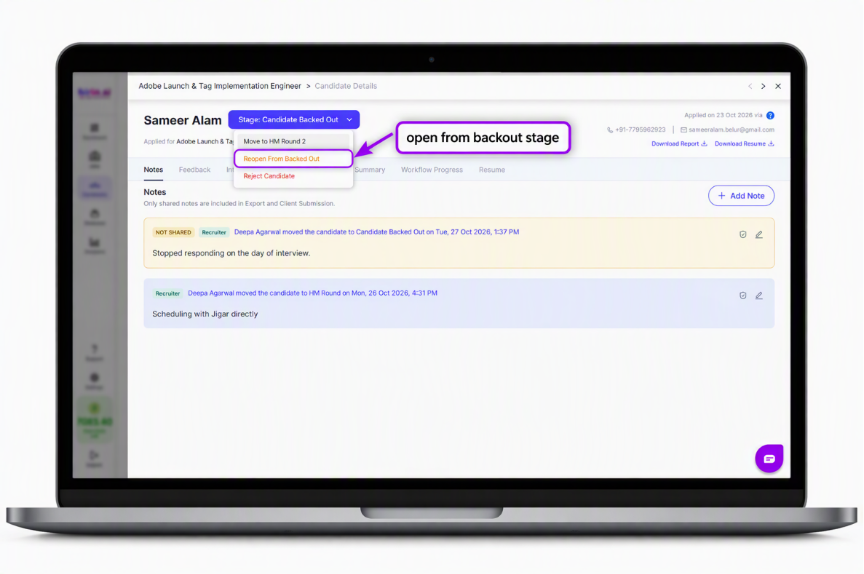
Figure 1: Reopen From Backed Out option in the Stage dropdown
Reopen several candidates
- Go to Job → Candidates.
- Select up to 50 backed-out candidates.
- Reopen them and enter a reason.
Good to Know
- A reason is required, and it is saved as a note on the candidate.
- You can reopen up to 50 candidates at once.
Value for You
- Pick up where you left off without adding the candidate again.
- Keep the candidate's full history in one place.
Was this article helpful?
That’s Great!
Thank you for your feedback
Sorry! We couldn't be helpful
Thank you for your feedback
Feedback sent
We appreciate your effort and will try to fix the article