How to add Feedback for candidates after interview:
Hiring Managers can submit interview feedback in Hirin.ai after completing an interview to help recruiters move candidates forward quickly.
When to Add Feedback:
- After the interview is completed.
- When the candidate status shows Feedback Awaiting.
- Timely feedback helps avoid hiring delays.
How to Add Interview Feedback:
- Option 1: Via Email (Recommended)
- Open the Interview Feedback Email sent by Hirin.ai
- Click the Feedback hyperlink ( as shown in the above image)
- Log in if prompted
- The candidate’s Feedback tab opens directly
- Option 2: Via Platform
- Log in to Hirin.ai
- Go to Candidates → select the job → open the candidate profile
- Click the Feedback tab
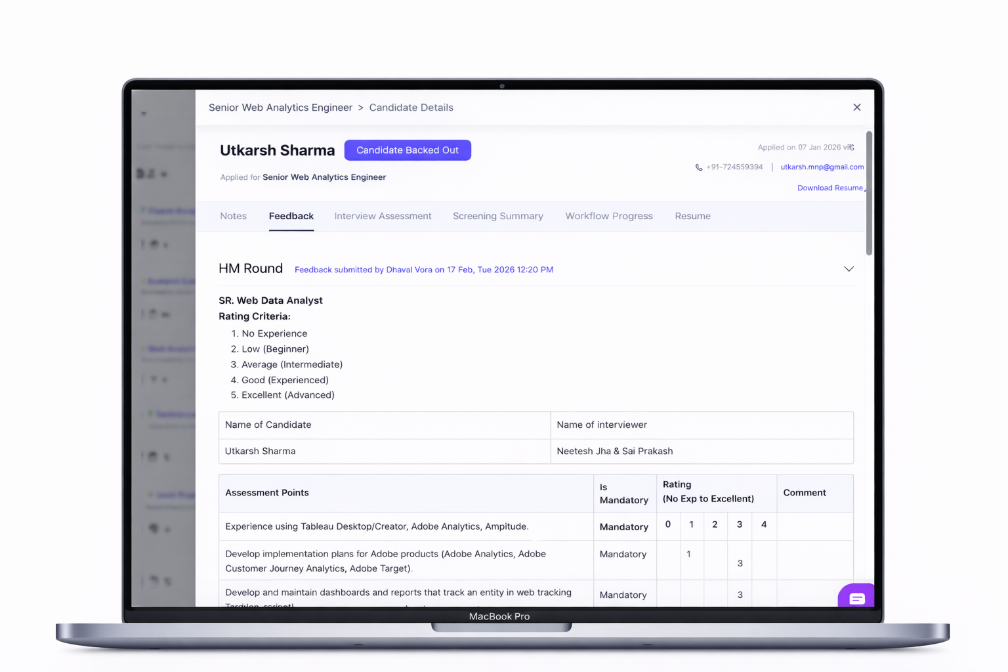
Figure 7: How to add Feedback for candidates after interview:
Fill and Submit Feedback:
- Rate the candidate using the available scale for each assessment point
- Complete behavioral/personality ratings if applicable
- Add brief comments highlighting strengths and concerns
- Click Submit Feedback
Once submitted, recruiters are notified and the candidate workflow is updated automatically.
Proceed or Reject the Candidate:
Hiring Managers can now decide the candidate's next step directly from the Feedback section, right after sharing their feedback.
Open the dedicated Feedback tab in Candidate Details.
- Add your feedback, notes and ratings for the candidate.
- Advance the candidate to the next stage, or reject the candidate, directly from the feedback flow.
- Your feedback history is preserved for future reference.
This enables faster hiring decisions and keeps the candidate pipeline moving efficiently.
Was this article helpful?
That’s Great!
Thank you for your feedback
Sorry! We couldn't be helpful
Thank you for your feedback
Feedback sent
We appreciate your effort and will try to fix the article