This guide explains how to create new screening criteria in Hirin.ai. Screenshots are included to help you navigate the feature.
Accessing the Screening Criteria Section
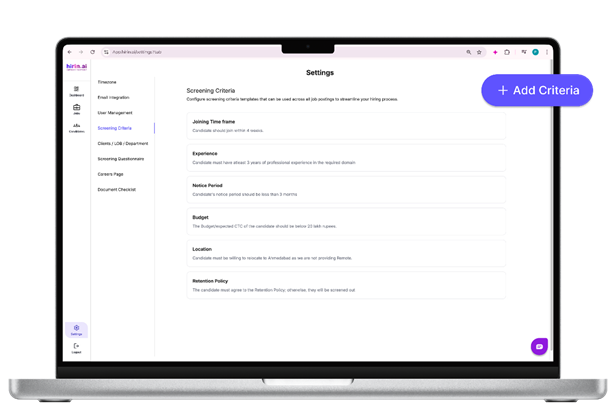
- Navigate to Settings from the left-hand menu and select Screening Criteria.
- Use this section to configure criteria that will be applied across all job postings.
Adding a New Screening Criteria
- Click on the “+ Add Criteria” button on the top-right side of the page.
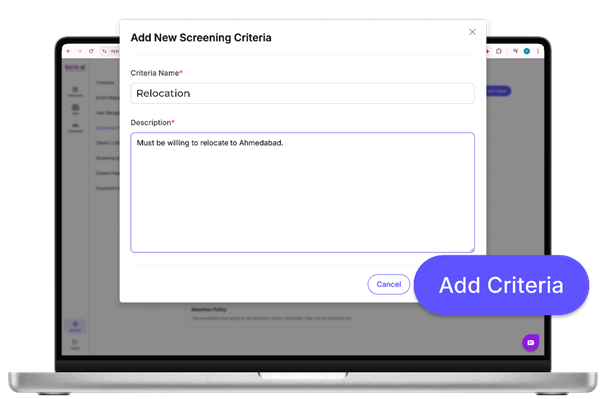
- This will open a pop-up form where you can define your new criteria.
Entering Criteria Details
In the pop-up form:
- Criteria Name: Enter the name of the criteria (e.g., Location, Budget, Experience, etc.).
- Description: Provide a clear explanation of the requirement (e.g., “Candidate must be willing to relocate to Ahmedabad.”).
After filling in the details, click Add Criteria to save.
Completion
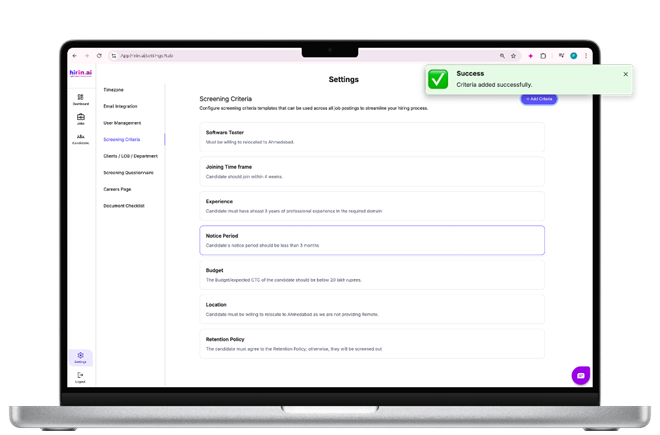
Your new screening criterion will now appear in the Screening Criteria list and can be applied to any job posting.
Edit or remove Screening Criteria and Auto-Rejection settings directly from a job workflow, with an impact preview showing affected candidates while keeping historical results unchanged.
Value for You
- Automatically reject candidates who do not meet predefined criteria
- Reduce manual effort spent screening irrelevant profiles
- Ensure only qualified candidates move forward in the workflow
- Improve recruiter efficiency and shortlisting speed
- Helps recruiters focus on the most relevant candidates faster
Was this article helpful?
That’s Great!
Thank you for your feedback
Sorry! We couldn't be helpful
Thank you for your feedback
Feedback sent
We appreciate your effort and will try to fix the article