Where to Find Screening Questionnaires
- Go to: Settings → Screening Questionnaire
- Here you can view all existing screening criteria templates.
How to Clone an Existing Screening Questionnaire
Cloning helps you reuse an existing questionnaire and make small changes instead of creating one from scratch.
Step 1: Select an Existing Template
- From the Screening Questionnaire list, find the template you want to reuse.
Step 2: Click on Clone
- Click the Clone icon next to the selected template.
- A new Create Questionnaire Template window will open with all questions already filled in.
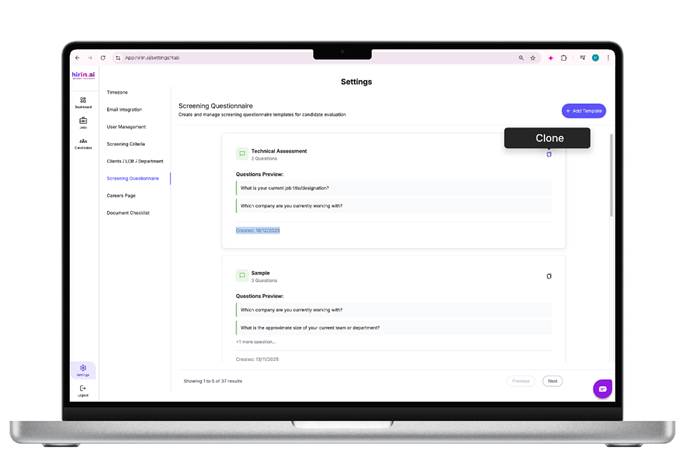
Figure 5: How to Clone an Existing Screening Questionnaire
Step 3: Update Details
- Change the Template Name
- Add or remove questions if required
- Add new standard or custom attributes if needed
Step 4: Save the Cloned Questionnaire
- Click Create Questionnaire to save the cloned version as a new screening criteria.
Result
The newly created or cloned screening questionnaire will now be available:
- For assigning to jobs
- For reuse across multiple positions
- To maintain consistent candidate screening
Value for You
- Reuse and customize screening questionnaires quickly
- Standardize candidate screening across job openings
- Collect key candidate information automatically
- Reduce manual follow-ups and setup effort
- Helps streamline early-stage screening and improve recruiter efficiency
Was this article helpful?
That’s Great!
Thank you for your feedback
Sorry! We couldn't be helpful
Thank you for your feedback
Feedback sent
We appreciate your effort and will try to fix the article