To-Do List
The To-Do List shows important actions you should not miss, such as interview scheduling, AI interview retries, and pending recruiter actions. Tasks are arranged from oldest to newest, so scroll down for the most recent items. Click a task to jump straight to the related candidate or job.
Sorting & Filtering the To-Do List
The To-Do List now includes search, filter and sort controls so you can narrow a long list down to the tasks you want to act on next.
- Use the Search box at the top of the panel to find a task by candidate or job name.
- Use the All dropdown to filter the list by task type, for example:
- CV Screening Pending
- Recommendation by Zena
- AI Interview retry limit reached
- Interview Scheduling Required
- Document Awaiting Review
- Offer Call Schedule Required
- Candidate Wrap-Up Required
- Select one or more task types and click Apply. Click Reset to clear the selection and show all tasks again.
- Use Sort By to reorder the list (for example, by how recently the task was raised).
- The result count and Previous / Next paging update to match the filtered list.
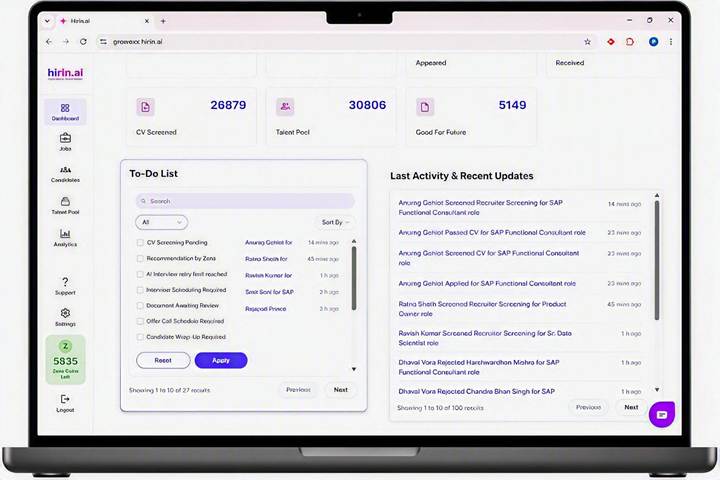
Filters and sorting apply only to the To-Do List panel and do not change the dashboard filters above it.
Last Activity & Recent Updates
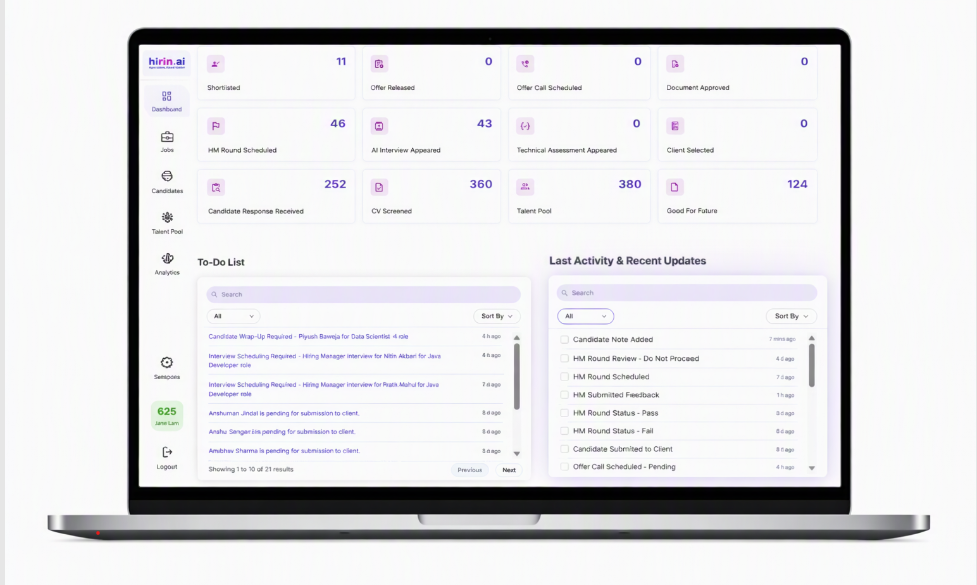
This panel shows real-time updates on platform activity — CV screening updates, candidate status changes, and interview progress — each with the candidate name, action, job role, and timestamp.
Filtering & Searching Recent Activity
The Recent Activity feed now includes advanced filtering, giving you clear visibility into candidate movements, screening results and recruiter actions across your jobs.
- View real-time activity updates across all your jobs.
- Filter activities by category, such as screening, interviews and submissions.
- Search activities by candidate name or job.
- Sort activities by date.
This helps your recruitment team stay aligned and quickly track important candidate and recruiter activities.
Was this article helpful?
That’s Great!
Thank you for your feedback
Sorry! We couldn't be helpful
Thank you for your feedback
Feedback sent
We appreciate your effort and will try to fix the article