The Recruiter Login & Logout Activity Tracking feature enables administrators to monitor user access and platform activity. This feature provides visibility into recruiter login sessions, supports compliance requirements, and helps track overall platform usage.
Access Permissions
Available to: Admin Users Only
Non-admin users will not have access to login/logout activity logs or audit tracking features.
What is Tracked?
The system automatically records the following user activity:
- Login Timestamp
- Logout Timestamp
These records are stored in the audit logs and can be reviewed by administrators at any time.
User Management Dashboard
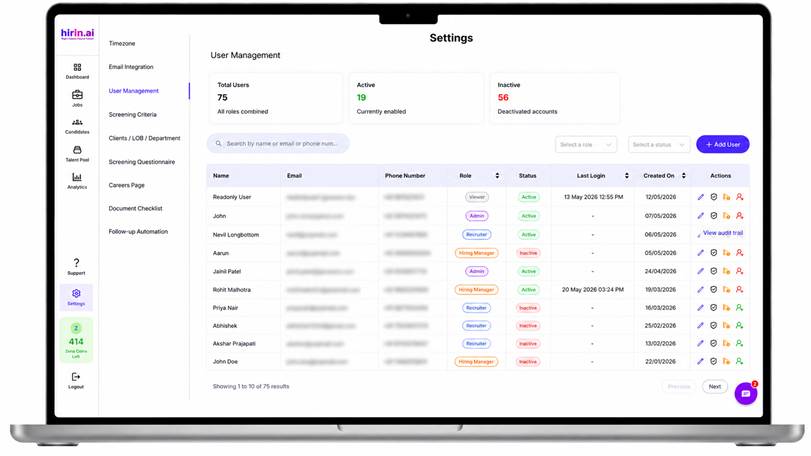
The User Management page now includes additional activity-related information:
Last Login
Displays the most recent login timestamp for each user.
User Summary Metrics
The dashboard provides quick visibility into overall user status:
- Total Users Count
- Active Users Summary
- Inactive Users Summary
These metrics help administrators understand platform adoption and user engagement.
Viewing Audit Logs
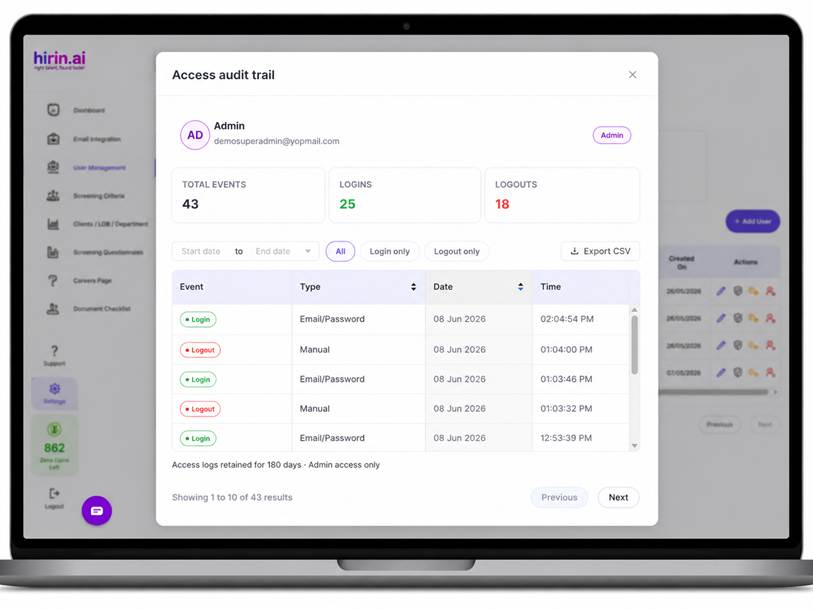
Administrators can review detailed login and logout activity through the Audit Log popup.
Steps to View Audit Logs
- Navigate to User Management.
- Locate the desired user.
- Click on the Audit Log option.
- A popup window will open displaying the user's activity history.
The audit log includes:
- Login events
- Logout events
- Event timestamps
Filtering Audit Logs
Administrators can filter activity records to quickly locate specific events.
Available Filters
Date Range
Select a start and end date to view activity within a specific period.
Event Type
Choose one of the following options:
- Login
- Logout
- All Events
The audit log will update based on the selected filters.
Exporting Audit Logs
Filtered audit log data can be exported for reporting and compliance purposes.
Steps to Export
- Apply the required filters.
- Click Export to CSV.
- The system will generate and download a CSV file containing the filtered activity records.
Benefits
This feature helps admins:
- Monitor recruiter platform usage
- Track user access activity
- Improve audit readiness and compliance
- Identify active and inactive users
- Maintain visibility into system access history
Was this article helpful?
That’s Great!
Thank you for your feedback
Sorry! We couldn't be helpful
Thank you for your feedback
Feedback sent
We appreciate your effort and will try to fix the article