Step-by-Step Process
1. Open the Job
- Go to the Jobs section.
- Select the job you want to add a feedback form to.
2. Go to the Workflow Tab
Click the Workflow tab from the top menu of the job page. This displays all stages, such as CV Screening, WhatsApp Template, AI Interview, and Hiring Manager rounds.
3. Find the Feedback Form Section
On the right-side panel, scroll down to the section titled Feedback Form (Optional). It appears below the Update Hiring Manager section.
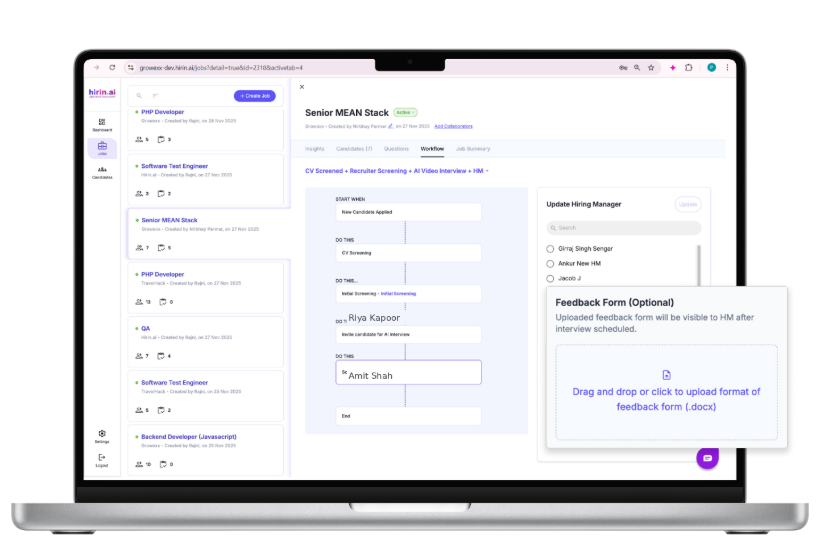
Figure 1: Feedback Form (Optional) section in the workflow panel
4. Upload the Feedback Form
- Click "Drag and drop or click to upload format of feedback form (.docx)" and upload your file.
- Note: only .docx files are supported.
5. Click Update
After uploading, click Update at the top-right of the same panel (where the Hiring Manager list and Feedback Form section appear). This saves the feedback form for the job.
6. How the Hiring Manager Uses It
Once an interview is scheduled, the Hiring Manager can access the uploaded feedback form, fill it out, and submit their feedback after the interview.
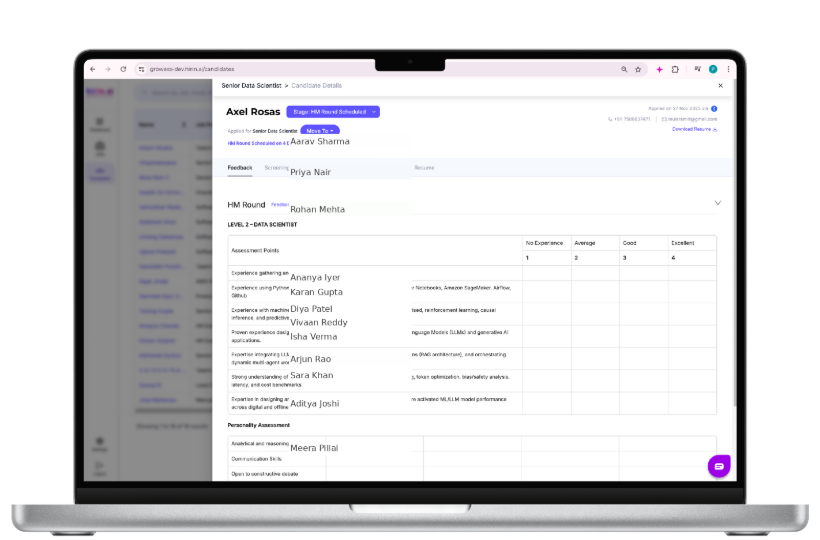
Figure 2: Hiring Manager accessing the feedback form
Was this article helpful?
That’s Great!
Thank you for your feedback
Sorry! We couldn't be helpful
Thank you for your feedback
Feedback sent
We appreciate your effort and will try to fix the article