Screening Notification Email:
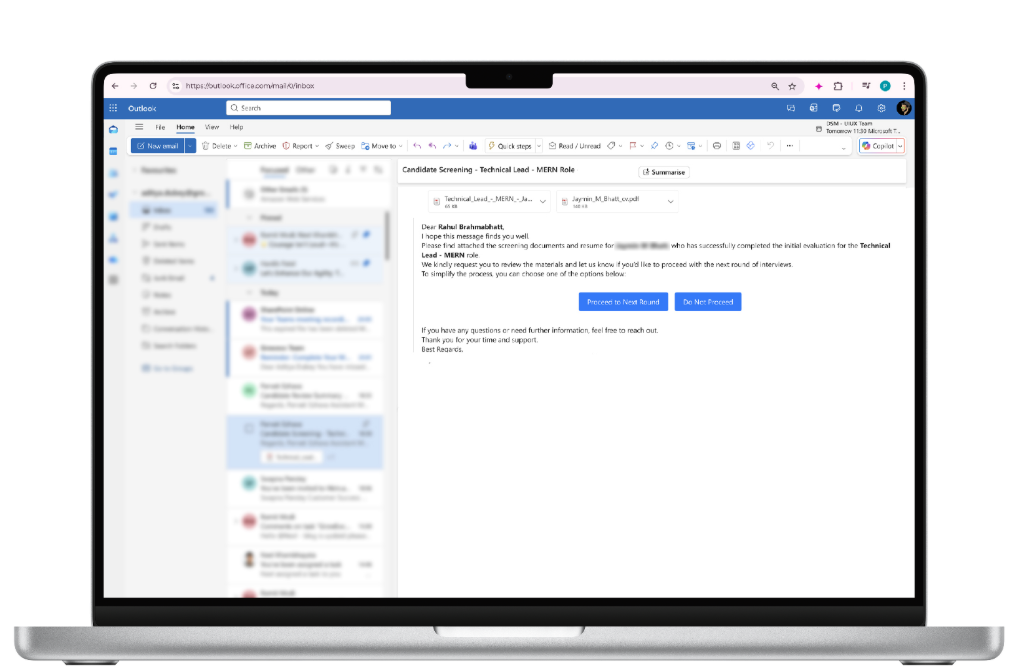
Once a candidate clears the AI Interview or Technical Assessment according to the job workflow, the Hiring Manager will receive an automated screening email from Hirin.
The email includes:
- Candidate details
- Screening documents and resume
- Action buttons to proceed or not proceed
1. Acting on the Screening Email
Within the screening email, the Hiring Manager will see two buttons:
Proceed to Next Round
- Click Proceed to Next Round if you wish to move the candidate forward.
- Once selected, the assigned recruiter is automatically notified to schedule the next interview round.
Do Not Proceed
- Click Do Not Proceed if you do not wish to move ahead with the candidate.
- You will be redirected to the Hirin Login Page.
- Log in using your Hiring Manager credentials.
- Navigate to the candidate profile where you will be prompted to add a rejection reason under the Notes section.
- Submit the reason to close the screening.
2. Post-Action Notifications
- Recruiters receive real-time updates based on the action taken.
- The candidate workflow is automatically updated in Hirin.
- Automated Interview Scheduling via WhatsApp (Zena – AI Agent)- Hirin.ai enables automated interview scheduling through WhatsApp using Zena (AI Agent). This feature allows interview scheduling to be completed without manual coordination between recruiters, hiring managers, and candidates.
How the WhatsApp-Based Scheduling Works-
- Zena initiates a WhatsApp conversation with the Hiring Manager informing them about the job they are assigned and collect available time slots and mode of interview (image 1 below)
- Similar way, Hiring Managers will be asked for their available slots every time for new profiles on the jobs assigned (image 2 below)
HM Review Pending Reminder Email – Quick ActionsThe HM Review Pending reminder email has been improved to make Hiring Manager decisions quicker.
What's Changed?
In the HM Review Pending reminder email, the two actions are now shown as icons against each candidate row:
- Proceed is represented by a green tick icon.
- Do Not Proceed is represented by a red cross icon.
The reminder lists newly added candidates along with those still awaiting your feedback, and a View link opens each candidate's screening details.
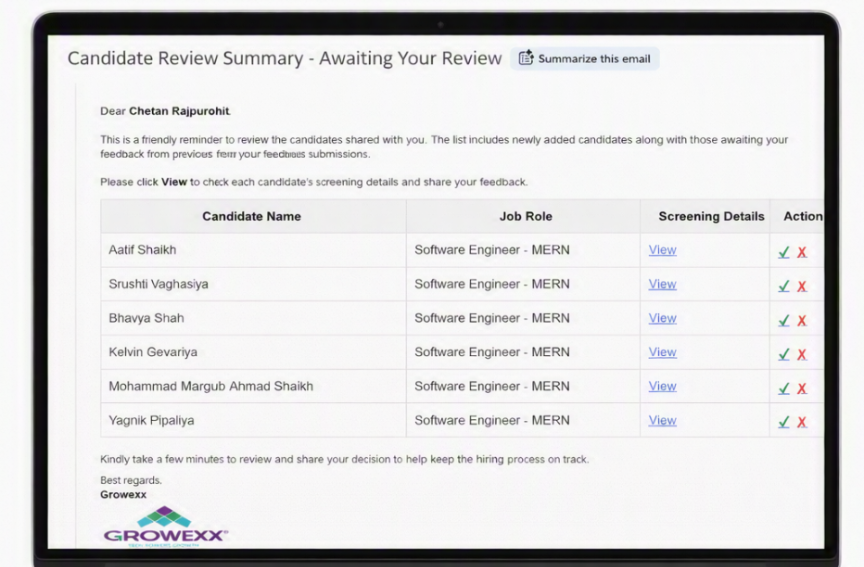
Figure 7: HM Review Pending reminder email with the Proceed and Do Not Proceed icons
Decision Logic
- There is no change to the existing decision-making logic.
- The actions work exactly as they did previously – only the presentation has been updated for a cleaner and quicker experience.
Was this article helpful?
That’s Great!
Thank you for your feedback
Sorry! We couldn't be helpful
Thank you for your feedback
Feedback sent
We appreciate your effort and will try to fix the article