Step-by-Step Process
Step 1: Open the Talent Pool
- Click Talent Pool in the left sidebar.
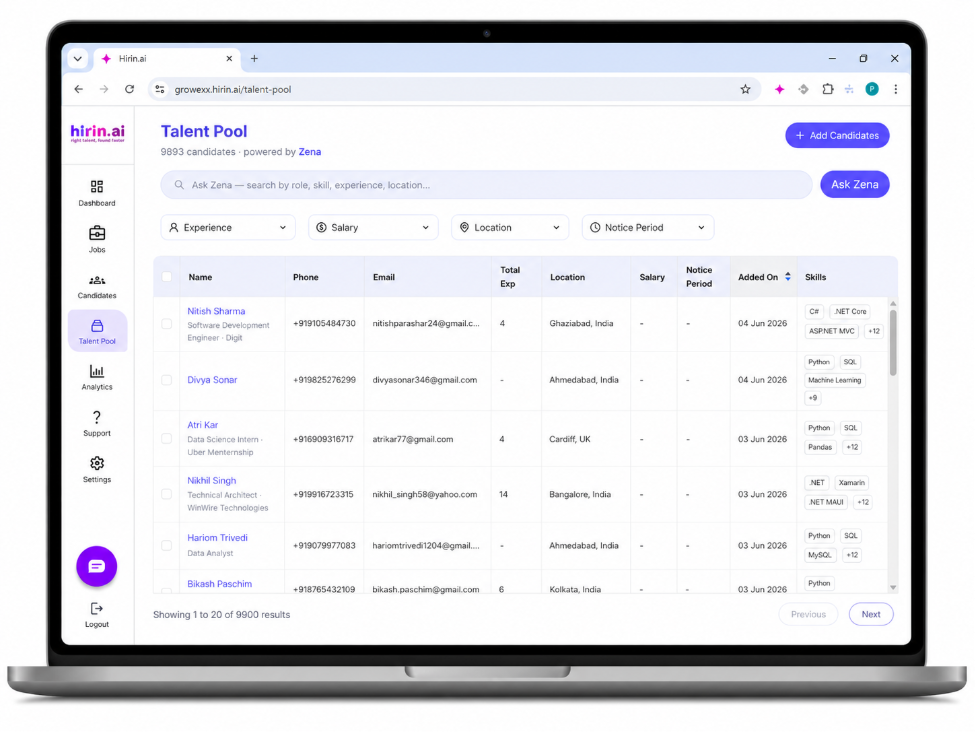
- The page header shows the total number of candidates in your pool (for example, "8,447 candidates · powered by Zena").
Step 2: Search with Ask Zena (natural language)
- Type a plain-English query into the search bar, e.g. "Power BI analysts in Ahmedabad with 4+ years".
- Click Ask Zena.
- Zena interprets your query and returns the most relevant candidates ranked for fit.
Step 3: Refine with filters
Use the filter chips above the results to narrow the list further:
- Experience – total years of experience.
- Salary – expected/current salary range.
- Location – candidate location.
- Notice Period – availability to join.
The results table shows Name, Phone, Email, Total Experience, Location, Salary, Notice Period, Added On date, and key Skills tags for each candidate.
Step 4: Review and add candidates
- Click a candidate's name to review their profile and skills.
- Select one or more candidates using the checkboxes.
- Use Add Candidates (top-right) to push selected candidates into a specific job and stage.
Was this article helpful?
That’s Great!
Thank you for your feedback
Sorry! We couldn't be helpful
Thank you for your feedback
Feedback sent
We appreciate your effort and will try to fix the article