Transfer Job Ownership allows you to assign another user as the owner of a job.
Prerequisites
- You are the Job Creator or an Admin.
- The new owner is an active user in Settings > User Management.
Steps to Transfer Job Ownership
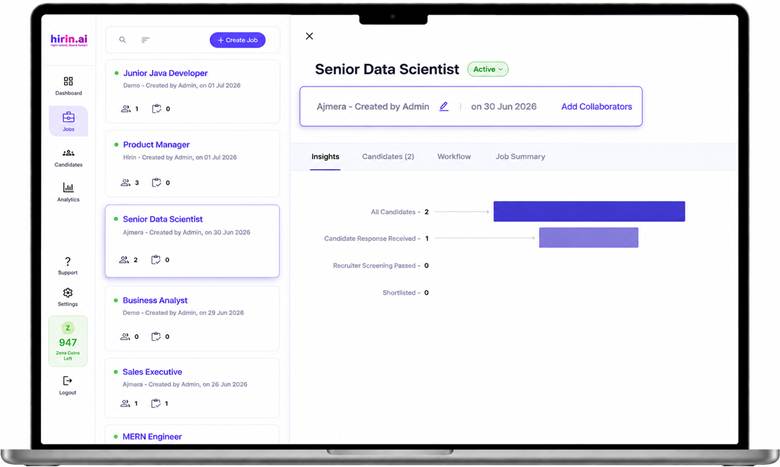
- Open the required Job.
- On the Job Details page, click the Edit (✏️) icon next to Created by.
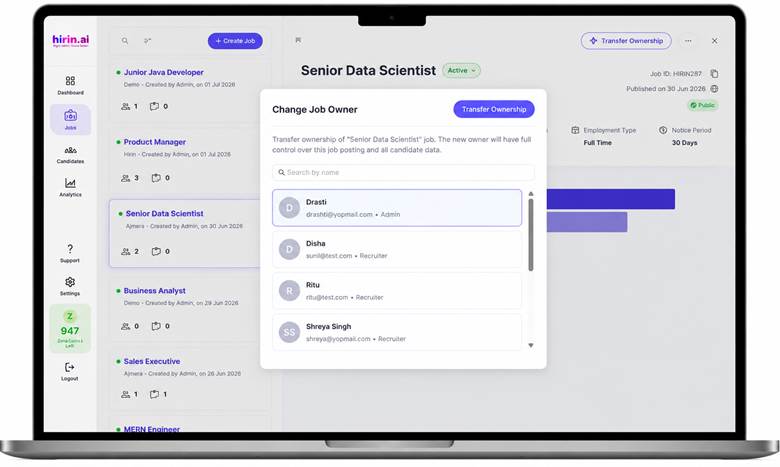
- The Change Job Owner window opens.
- Search for and select the user who should become the new Job Owner.
- Click Transfer Ownership.
Notes
- Ownership can only be transferred to an active user within your organization.
- The new owner will have full control over the job, including candidate management and workflow.
- All existing job details, candidates, interview data, and collaborators remain unchanged after the transfer.
- Only one user can be the Job Owner at any time.
Was this article helpful?
That’s Great!
Thank you for your feedback
Sorry! We couldn't be helpful
Thank you for your feedback
Feedback sent
We appreciate your effort and will try to fix the article