Recruiters can now generate a single, comprehensive Candidate Interview Assessment Report directly from Candidate Details and share it with the Hiring Manager. The report brings the candidate's screening and interview evaluation together into one structured document.
Where to Find It
Candidates → Candidate Details → Download Report
- The Download Report option sits next to the Download Resume action in the Candidate Details header.
- Download the report for your own review, or share it directly with the Hiring Manager.
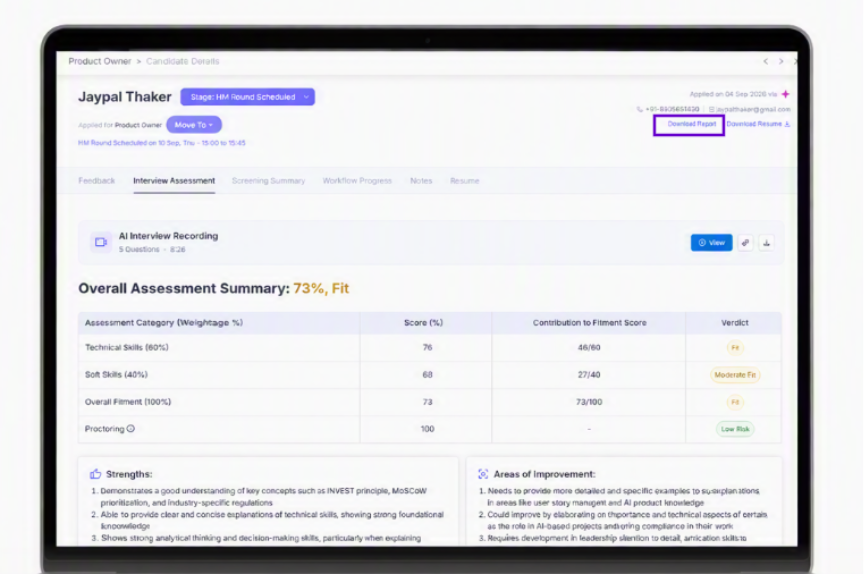
Figure 1: The Download Report option on the Candidate Details page
What the Report Contains
Candidate Overview
The report opens with a consolidated profile summary:
- Candidate name and profile details
- Job role and Client
- Zena's recommendation
- Candidate strengths and weaknesses
- Current CTC and Expected CTC
- Notice period and Location
Scorecards
The report includes dedicated scorecards for:
- Screening Summary – CV screening score
- Interview Assessment – interview score
- Proctoring details
- Overall risk assessment
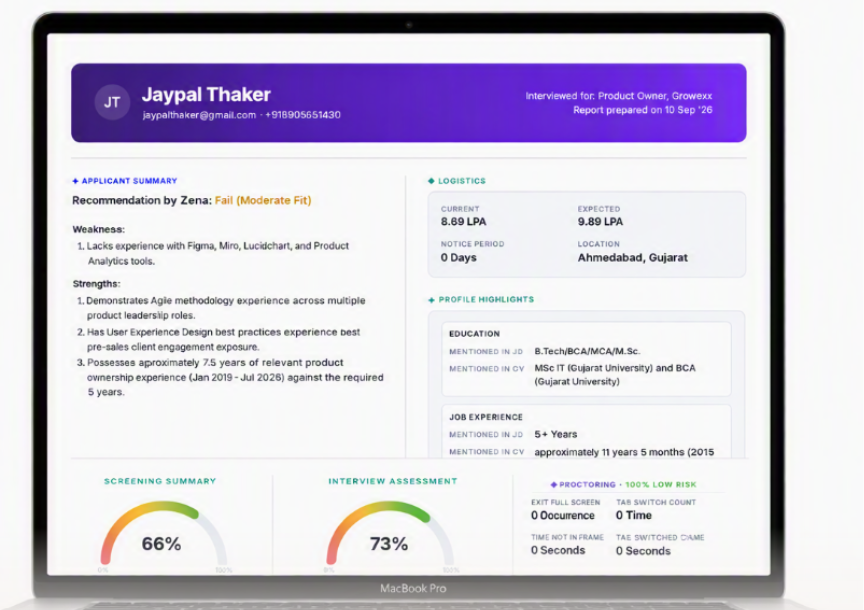
Figure 2: Candidate Interview Assessment Report – overview, logistics and scorecards
Skill Evaluation
The report provides a detailed view of the skills evaluated during the recruitment process.
- Must Have & Good To Have Skills
- Each skill is listed separately
- A clear Matched / Not Matched status is shown against each skill
- Technical & Soft Skills
- Per-skill scores
- Strengths
- Areas of improvement
- Zena's recommendation
Conversation Evidence
The report also includes the candidate's relevant interaction history:
- WhatsApp chat log
- AI Call transcript
- AI Video Interview transcript
The speaker's name is displayed within each response, making the conversation easier to follow.
Workflow-Aware Report
The report automatically adapts to the candidate's workflow.
- Stages that are not part of the workflow are excluded from the report.
- If a recruiter manually skips a stage, the report clearly displays: “Recruiter manually skipped this stage.”
- The report reflects the relevant Hiring Manager round, including HM1 and HM2 where applicable.
Sharing the Report with the Hiring Manager
When the report is shared with the Hiring Manager:
- The candidate's resume is shared as a separate attachment.
- The resume does not appear inside the report itself.
Important Notes
- Current CTC and Expected CTC are hidden from the report by default.
- If your organization needs CTC information displayed, the Product Team can enable it for your tenant on request.
- The report reflects only the stages the candidate has actually progressed through.
- Proctoring details appear only for candidates who completed an AI Video Interview.
Value for You
With this feature, recruiters can:
- Share one consolidated evaluation instead of multiple screenshots and documents
- Give Hiring Managers screening, interview, skill and proctoring insights in a single view
- Support faster, better-informed Proceed / Do Not Proceed decisions
- Keep evaluation records consistent across candidates and jobs
→ One report, shared in one click, with everything the Hiring Manager needs.
Was this article helpful?
That’s Great!
Thank you for your feedback
Sorry! We couldn't be helpful
Thank you for your feedback
Feedback sent
We appreciate your effort and will try to fix the article