Accessing Document Checklist
- Go to the left sidebar
- Click Settings
- Select Document Checklist
- Click + Add Your First Document to begin
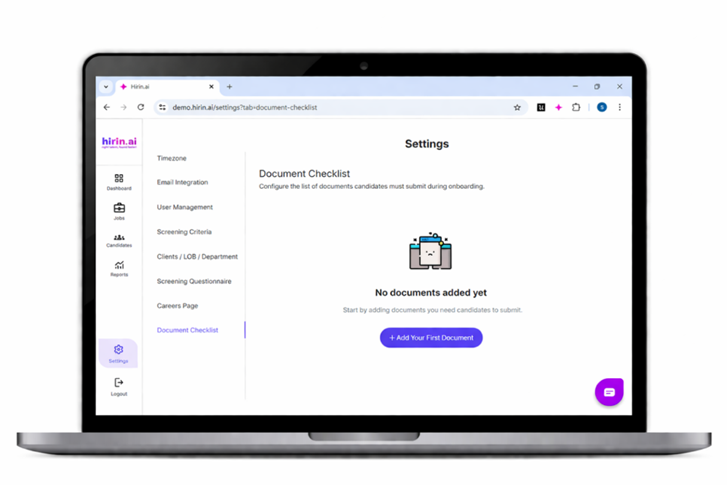
Figure 1: Accessing Document Checklist
Adding a Document
- Click Add Document
- Fill in:
- Document Name*
- Client / LOB / Department*
- Description (Optional)
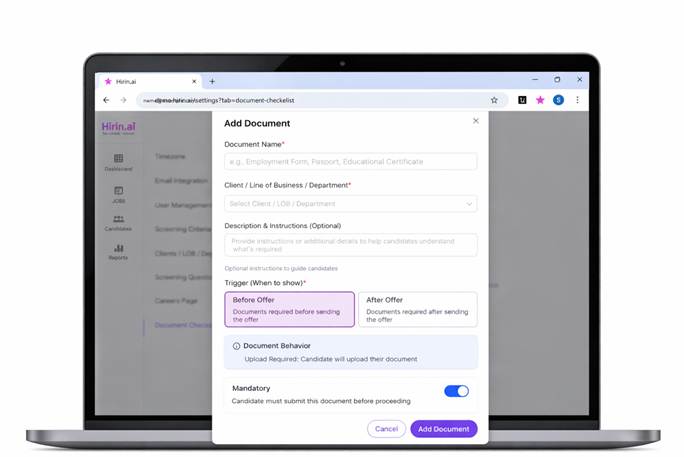
Figure 2: Adding a Document
Setting When to Request
- Choose when the document is required:
- Before Offer – before sending the offer
- After Offer – after sending the offer
Document Rules
- Candidates must upload the document
- Enable Mandatory if submission is required to proceed
Save
- Click Add Document to save
- Click Cancel to discard
- The document will now be added to the checklist
Value for You
- Standardize document collection across hiring workflows
- Ensure candidates submit required documents at the right stage
- Reduce manual follow-ups and save recruiter time
- Improve document tracking and verification efficiency
- Helps streamline document collection and reduce administrative effort during hiring
Was this article helpful?
That’s Great!
Thank you for your feedback
Sorry! We couldn't be helpful
Thank you for your feedback
Feedback sent
We appreciate your effort and will try to fix the article