Recruiters and Hiring Admins can configure automated follow-up rules from Settings → Follow-up Automation to manage candidates who do not respond. Reminders are sent automatically and stop the moment a candidate replies.
Follow-up Modes
- Sequence Mode – Enabled by default for all jobs.
- Blended Mode (Smart Follow-up) – An adaptive smart follow-up option.
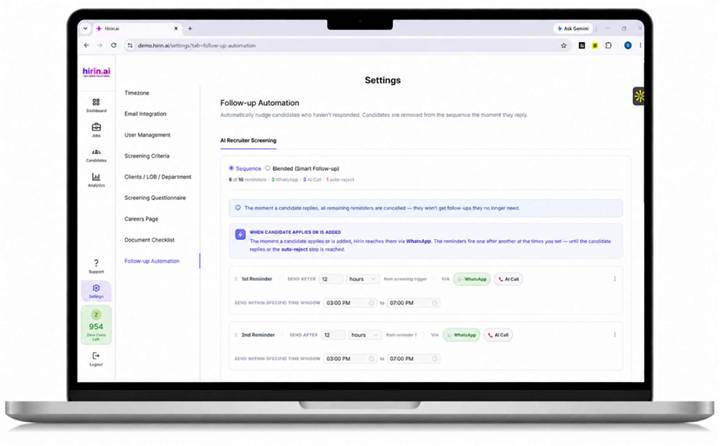
Figure 1: Follow-up Automation settings page
Reminder Configuration
You can configure:
- Up to 10 reminders.
- A custom delay for each reminder (minutes / hours / days).
- The reminder channel (e.g., WhatsApp, AI Call).
- A working-hours window during which reminders are sent.
Auto-Reject Automation
- After all reminders are exhausted, the system automatically sends a final auto-reject message.
- The auto-reject step is mandatory and cannot be removed.
- The timing of the auto-reject can be configured.
Automation Rules
- The follow-up sequence automatically stops once the candidate responds.
- Organization-level settings act as the default automation configuration for all new jobs.
Updating Follow-up Automation
- New candidates will use the updated rules.
- Existing candidates already in a sequence continue with their current automation flow, so active candidate journeys are not disrupted.
Was this article helpful?
That’s Great!
Thank you for your feedback
Sorry! We couldn't be helpful
Thank you for your feedback
Feedback sent
We appreciate your effort and will try to fix the article